Topic 1 Introduction to CSS
What is CSS?
CSS stands for Cascading Style Sheets.
It is used to design and style webpages beautifully.
Think about websites like YouTube, Netflix, Instagram, or Amazon. Without CSS, all those websites would look plain white pages with simple black text.
CSS adds:
-
colors
-
spacing
-
animations
-
layouts
-
responsive design
-
fonts
-
hover effects
HTML creates the structure of the webpage, while CSS makes it attractive and professional.
Quick Tip:
If your website looks boring, the problem is usually not HTML — it is missing CSS styling.
Real Life Analogy
HTML = Skeleton
CSS = Clothes & Style
JavaScript = Brain & Movement
Without CSS, websites have structure but no beauty.
What Does CSS Control?
CSS controls:
-
text color
-
background color
-
image size
-
spacing
-
alignment
-
mobile responsiveness
-
animations
-
hover effects
Think About It
If every website had only HTML and no CSS:
-
Would Instagram still look attractive?
-
Would YouTube feel modern?
-
Would online shopping websites look trustworthy?
That is the power of CSS.
Your First CSS Example
<!DOCTYPE html>
<html>
    <head>
        <style>
h1{
       color: blue;
}
      </style>
   </head>
   <body>
     <h1>Hello CSS</h1>
    </body>
 </html>
Output:
Hello CSS
Beginner Tip:
Always practice by changing colors yourself.
Try:
- red
- green
- orange
- purple
Experimenting is how real developers learn.
History of CSS
CSS was created in 1996 by Håkon Wium Lie.
Before CSS existed, developers had to design webpages directly inside HTML which made websites messy and difficult to manage.
CSS solved this problem by separating:
-
structure → HTML
-
design → CSS
CSS Timeline
1996 → CSS1 Released
1998 → CSS2 Released
2011 → CSS3 Released
Today we use modern CSS3.
Why CSS is Important
CSS helps developers create:
- Beautiful websites
- Mobile-friendly layouts
- Professional UI design
- Animations
- Responsive webpages
- Modern user experiences
Without CSS, modern web design would not exist.
Small Question
Why do you think companies spend millions designing beautiful websites instead of plain webpages?
Because design affects:
- trust
- user experience
- sales
- attention
Topic 2 Adding CSS to HTML
There are 3 ways to add CSS.
1. Inline CSS
Inline CSS is written directly inside HTML tags.
Example
<p style="color:red;">Hello World</p>
Output:
Tip:
Inline CSS is useful for quick testing but not recommended for large projects.
2. Internal CSS
Example:
<style>
h1{
 color: blue;
}
</style>
3. External CSS
External CSS is written inside a separate .css file.
Example:
<link rel="stylesheet" href="style.css">
Professional Developer Tip:
Real websites mostly use External CSS because it keeps code clean and organized.
Quick Practice Question
Which method do professional websites mostly use?
A) Inline CSS
B) Internal CSS
C) External CSS
Topic 3 CSS Syntax
CSS follows a simple structure.
Example
h1{
  color: blue;
   font-size: 40px;
}
Parts of CSS
Selector
H1
Selects the HTML element.
Property
Color
What you want to change.
Value
Blue
The style applied.
Easy To Momorize
Selector → What to style
Property → What to change
Value → New appearance
Topic 4 Colors in CSS
Colors make websites attractive.
Text Color
Change The Text Color.
Example
h1{
color: red;
}
Background Color
Example
body{
background-color: lightblue;
}
Types of Colors
Color Names
HEX Colors
RGB Colors
Design Tip:
Avoid using too many bright colors together. Professional websites usually use 2–4 main colors only.
Mini Question
Why do dark mode websites feel modern and comfortable to use?
Because dark colors reduce eye strain and create a premium look.
Topic 5 Fonts and Text Styling
CSS can completely change text appearance.
Font Size
p{
font-size: 20px;
}
Font Family
Text Alignment
Font Weight
p{
 font-weight: bold;
}
UI Design Tip:
Good typography makes websites feel professional even with simple layouts.
Mini Challenge
Try creating:
-
one centered heading
-
one red paragraph
-
one large button
Practice is more important than memorizing.
Topic 6 Margin and Padding
Spacing is one of the most important parts of web design.
Margin
Creates space outside elements.
Padding
Creates space inside elements.
Easy Trick to Remember
Margin = outside spacing
Padding = inside spacing
Quick Question !!!
Why do beginner websites often look messy?
Because they forget proper spacing.
Good spacing = professional design.
Topic 7 Borders in CSS
Borders create outlines around elements.
Example
Rounded Corners
Modern Design Tip:
Rounded corners make websites feel modern and friendly.
That is why apps like:
-
Spotify
-
Discord
-
YouTube
use rounded designs everywhere.
Topic 8 CSS Box Model
Every HTML element is actually a box.
The box model contains:
-
content
-
padding
-
border
-
margin
Most Important CSS Concept !!
Almost every layout problem in CSS is connected to the box model.
Master this topic carefully.
Quick Question
If text touches the border directly, what should you add?
Topic 9 Flexbox
Flexbox helps arrange items easily.
Example
Why Flexbox is Powerful
It helps create:
-
navigation bars
-
responsive layouts
-
card sections
-
centered content
Beginner Tip:
Flexbox is one of the most important CSS skills for modern web development.
Topic 10 Hover Effects
Hover effects happen when the mouse moves over an element.
Example
Uses of Hover Effects
-
buttons
-
cards
-
menus
-
links
-
images
UI Tip:
Small hover effects make websites feel interactive and modern.
Topic 11 Responsive Design
Responsive design means websites adjust to different screen sizes.
Examples:
-
mobile phones
-
tablets
-
laptops
-
desktops
Media Query Example
Very Important
Today most users browse websites using phones.
If your website is not mobile-friendly, users may leave immediately.
Topic 12 CSS Animations
Animations make websites dynamic and engaging.
Example
Animation Uses
-
button hover effects
-
loading animations
-
image sliders
-
fading effects
Professional Tip:
Good animations improve user experience. Too many animations make websites slow and distracting.
Topic 13 CSS Best Practices
Write Clean Code
Use proper indentation.
Use External CSS
Keeps projects organized.
Use Meaningful Class Names
Organize Files Properly
Example:
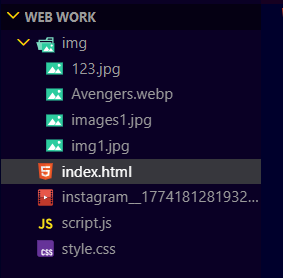
Developer Habit:
Professional developers spend time organizing files because large projects can contain thousands of files.
Topic 14 Real CSS Projects
Project 1 — Portfolio Website
Create:
-
hero section
-
skills section
-
contact form
-
responsive layout
Project 2 — Blog Website
Create:
-
navigation bar
-
article cards
-
sidebar
-
footer
Project 3 — Restaurant Website
Create:
-
menu cards
-
reservation form
-
gallery section
Final Challenge
Can you combine:
-
HTML structure
-
CSS styling
-
responsive layout
to create your own real website?
That is how real developers grow.
“Every beautiful website you see today once started with simple HTML and basic CSS. Do not worry about making everything perfect in the beginning. Real developers improve by practicing, experimenting, making mistakes, and building projects consistently. Keep coding, keep designing, and keep creating — because every line of CSS you write brings your ideas to life on the web.”